Pakistan Passport Photo Rejected? 8 Common Mistakes and How to Fix Them
A rejected photo can stall your whole passport application, and many problems are small and fixable. This guide goes through eight common mistakes, based on the photo requirements published by the Directorate General of Immigration and Passports (DGIP), and shows how to correct each one before you try again.
This site is not affiliated with DGIP, NADRA or any government agency. Rules can change, so always confirm the current requirements on the official DGIP page: onlinemrp.dgip.gov.pk/photo-requirements. Statements below marked "DGIP says" come from that page. Anything marked "Our tip" is practical advice, not an official rule.
The Quick Checklist Before You Retake
| DGIP requirement | What to check |
|---|---|
| Size | 45 mm high x 35 mm wide, professionally taken |
| Age of photo | Not more than 6 months old |
| File size (online) | Should not exceed 5 MB |
| Background | Plain white |
| Framing | Close-up of full head and shoulders, matching DGIP's dimension diagram |
| Face | Facing forward, neutral expression, mouth closed, eyes open |
| Editing | Not cut down from a larger picture, not edited in software |
DGIP says photos may be rejected if they do not meet these points. If your photo misses any row, one of the mistakes below is the likely cause.
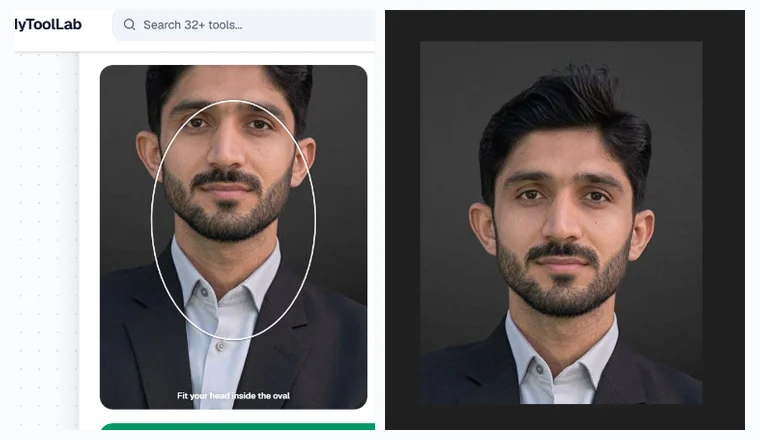
1. Face Too Close to the Camera (Over-Cropped)
DGIP asks for a close-up of your full head and shoulders. When your forehead or chin touches the edge of the frame or your shoulders are cut off, the photo no longer shows that.
Our tip: Step back and hold the camera at eye level. Avoid arm's-length selfies, because the short distance makes the face fill the frame and distorts it. Leave space around your head and include both shoulders.
2. Face Too Small in the Frame
A tiny face surrounded by shirt and wall is the opposite problem. DGIP says the photo must comply with its dimension diagram, and a very small face is unlikely to match it.
Our tip: Move slightly closer, or ask the photographer to frame from the chest up. Then compare your photo with the diagram on the official DGIP page.
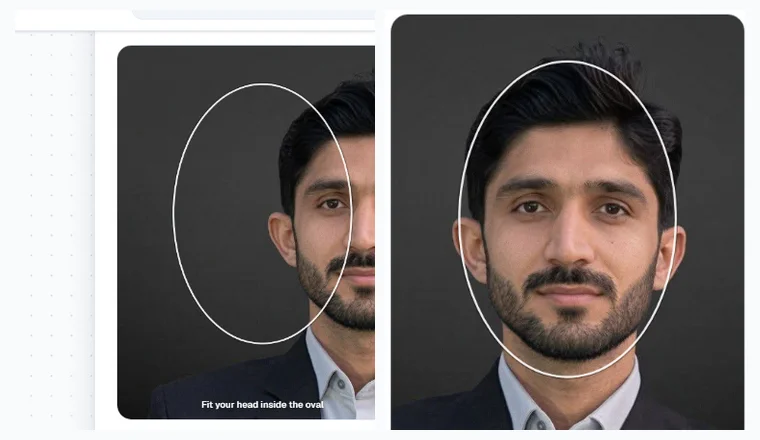
3. Head Off-Center or Tilted
DGIP says you should face forward and look straight at the camera. A head pushed to one side or tilted does not meet that.
Our tip: Line your nose up with the middle of the frame, keep your chin level, and keep both shoulders visible and even.
4. Anything Covering the Face
DGIP says photos may be rejected unless nothing is covering your face.
Our tip: Remove hats and anything that casts a shadow across your face, and move hair away from your eyes. If you have a religious or medical situation, check the official DGIP page or contact DGIP directly. We could not verify any exceptions, so we do not guess.
5. Glasses With Glare or Reflection
DGIP says your eyes must be open, visible and free from reflection or glare from glasses.
Our tip: Tilt the glasses slightly downward, change the angle of your light source, or take the photo without glasses if that works for your situation.
6. Other People or Objects in the Shot
DGIP says the photo must be only of you, with no other objects or people.
Our tip: Stand in front of a clean, empty wall and ask the photographer to check the edges of the frame before shooting.
7. Wrong Background or Shadows
DGIP asks for a plain white background in clear contrast to you. Dark, patterned or coloured backgrounds do not match that.
Our tip: Use a plain white wall or sheet and stand a little away from it so your shadow does not fall on it. Light your face evenly from the front, for example by facing a window in daylight. Because DGIP says the photo should be professionally taken, a photo studio is the safest option if you are unsure.
8. Cropped, Edited or Outdated Photos
DGIP says photos cannot be cut down from larger pictures, must not be edited in software such as Photoshop, and must be no more than 6 months old.
Our tip: Take a fresh photo, framed correctly when you shoot it, instead of trimming an old one.
Using the Passport Photo Maker (and What It Can't Do)
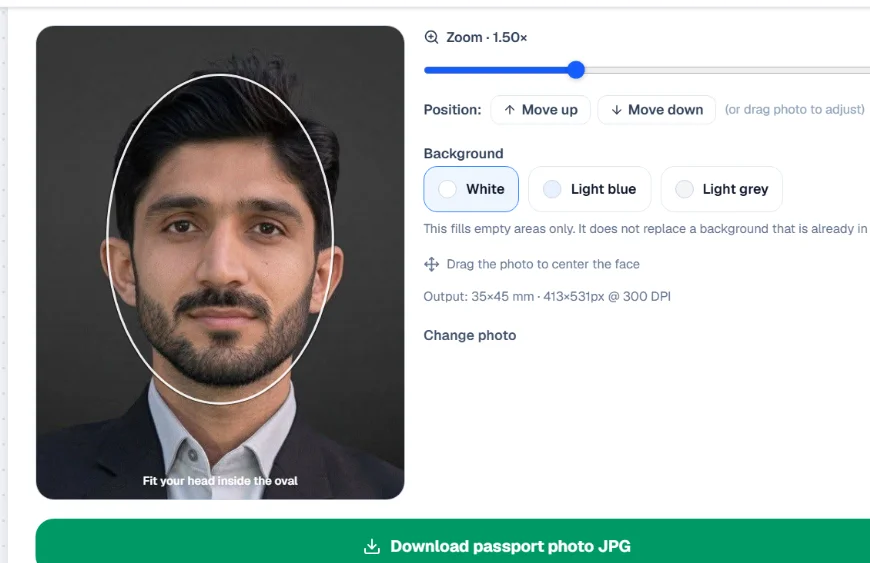
Our free Passport Photo Maker helps you prepare an image at 35 x 45 mm (413 x 531 px at 300 DPI) and position your face inside a guide oval.
- It resizes and frames your image to passport proportions.
- It lets you choose a background fill colour for empty areas around the photo.
- It does not replace a dark or patterned background already in your photo. Start with a picture taken against a white wall.
- DGIP says photos must be professionally taken and not edited, so check DGIP's rules before applying online. This tool is a good fit for printed copies and other uses.
Frequently Asked Questions
What is the passport photo size in Pakistan?
DGIP states 45 mm high by 35 mm wide.
How old can my passport photo be?
Not more than 6 months old.
What is the maximum file size for the online application?
DGIP says the digital file should not exceed 5 MB.
Can I crop a bigger photo to passport size?
DGIP says photos cannot be cut down from larger pictures or edited in software like Photoshop, so take a correctly framed photo instead.
Why do glasses cause rejection?
DGIP says your eyes must be open, visible and free from reflection or glare from glasses.
Can I smile in my passport photo?
DGIP asks for a neutral expression with your mouth closed.